Call transfer
Call transfer hands the call to a person or another number, optionally with a message for each side while connecting.
Every text setting of this brick takes variables and contact fields, such as {{contact.first_name}}. Number, switch and list settings do not. See Variables.
When to use
Section titled “When to use”The caller asks for a person, the agent cannot help, a lookup failed, or the case needs a human decision. Pattern with fallbacks: Recipe: hand over to a person.
Settings
Section titled “Settings”| Setting | What it does | Default |
|---|---|---|
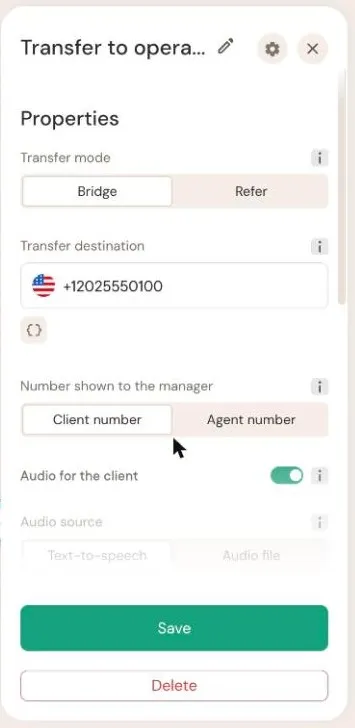
| Transfer mode | Bridge connects caller and manager through the platform; Refer hands the call to the manager with SIP REFER | — |
| Transfer destination | A phone number, a variable such as {{recipient.number}}, or a dial string | — |
| Number shown to the manager | Client number or Agent number | — |
| Audio for the client | Text-to-speech or an audio file while connecting, for example Please hold | — |
| Audio for the manager | What the manager hears before the caller is connected | — |
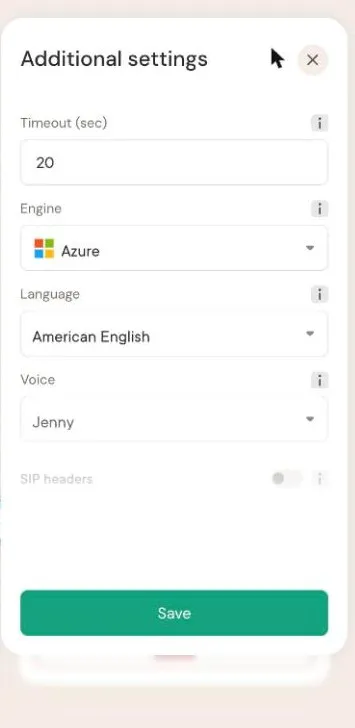
| ⚙ Timeout | How long to wait for the manager to answer | 20 s |
| ⚙ Voice | The voice for this brick | Scenario voice |
| ⚙ SIP headers | Headers with values of scenario variables, for example the reason for the call | — |
Outputs
Section titled “Outputs”| Output | When |
|---|---|
| Success | The transfer connected |
| Fail | The transfer did not connect |
Example
Section titled “Example”Connect both Choose topic → Operator (Question) and Get order status → Error (HTTP request) to one Call transfer with Please hold while I connect you to an operator. Fail → an apology with opening hours → End scenario.
Good practice
Section titled “Good practice”- Always connect Fail.
- Give the manager context: an Audio for the manager message or SIP headers with the caller’s topic, detected language or ticket number.
- Use Client number if managers call customers back from their own system.
After a Refer transfer the call leaves the platform. No more audio or speech is recorded, but the bricks after Success that need no call (Goal, Conditions, JavaScript, HTTP request) still run and are recorded.