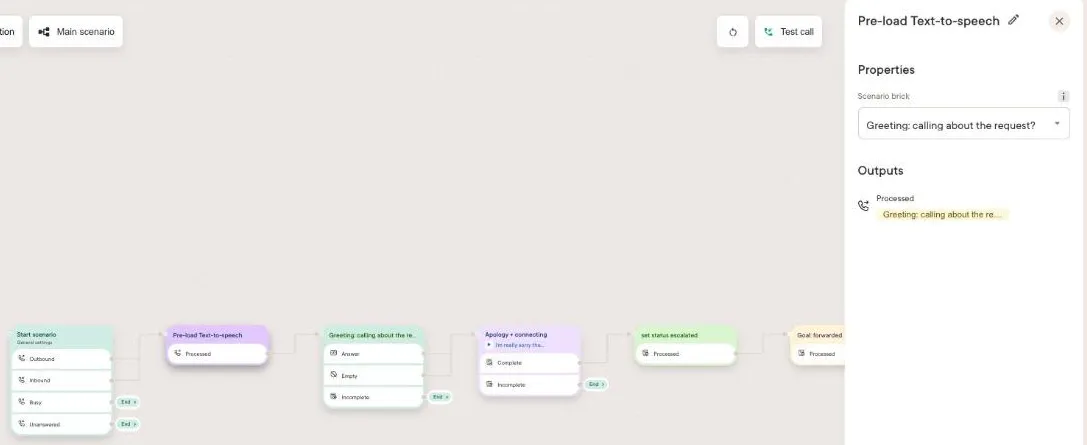
Pre-load Text-to-speech
Pre-load Text-to-speech generates the audio of another brick’s personalised message in advance, so the caller hears it without a pause. The flow does not wait for it: the audio is generated in parallel while the bot speaks.
Every text setting of this brick takes variables and contact fields, such as {{contact.first_name}}. Number, switch and list settings do not. See Variables.
When to use
Section titled “When to use”Outbound calls that open with a message built from contact data, such as Hello {{contact.first_name}}, this is a reminder about your appointment on {{contact.date}}. Speech synthesis takes a moment; pre-loading hides it.
Settings
Section titled “Settings”| Setting | What it does |
|---|---|
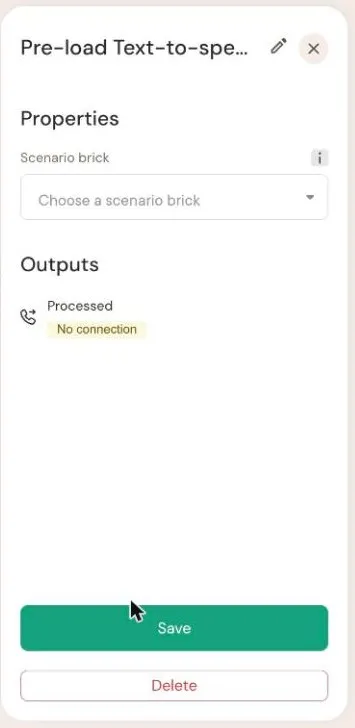
| Scenario brick | The Text-to-speech, Audio sequence, Question or Call transfer bricks whose messages should be generated ahead. Pick only bricks whose text holds a variable: a fixed message is cached anyway, and a scenario that pre-loads one is refused when saved |
Outputs
Section titled “Outputs”| Output | When |
|---|---|
| Processed | The pre-load was requested; the flow continues at once |
Good practice
Section titled “Good practice”Place it early in the flow, right after Start scenario and before the bricks it pre-loads. One Pre-load brick can prepare several messages, for example a greeting with the caller’s request number and a later question that names it again.