Outbound call
Removed in API 1.80.0. New scenarios do not have this brick: its outputs are now the Outbound, Voicemail, Busy and Unanswered outputs of Start scenario. Stored scenarios were moved automatically, and a call runs through the same bricks as before. The text below describes the old brick and will be deleted.
Outbound call starts the flow when the agent places a call, from an automation or the API; it is one of the four fixed bricks of every scenario.
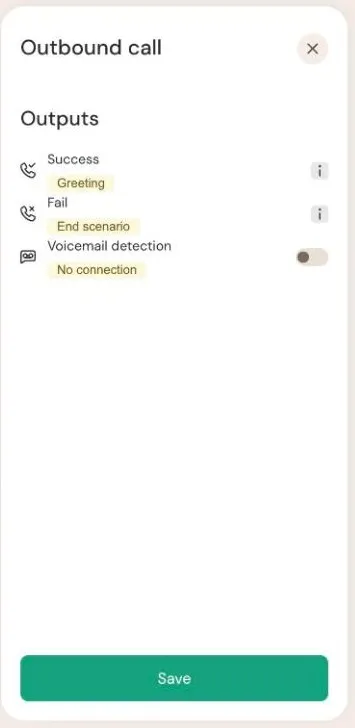
Settings
Section titled “Settings”| Setting | What it does |
|---|---|
| Voicemail detection | Adds a third output for calls answered by an answering machine |
Outputs
Section titled “Outputs”| Output | When |
|---|---|
| Success | The contact answered |
| Fail | The call did not connect: no answer, busy, rejected |
| Voicemail detection | An answering machine picked up (only with Voicemail detection on) |
Example
Section titled “Example”A reminder call: Success → a personalised greeting Hello {{contact.first_name}} → Question; Voicemail detection → a short Text-to-speech message → End scenario; Fail → End scenario.
Good practice
Section titled “Good practice”- Connect Success to the greeting when the scenario places outbound calls. In an inbound-only scenario keep the brick and wire Success and Fail to End scenario: publishing fails if a scenario has no Outbound call brick.
- For personalised greetings, place Pre-load Text-to-speech early so the first phrase plays without a pause.
Related
Section titled “Related”Inbound call, Automations, Quick start: outbound calls