SMS
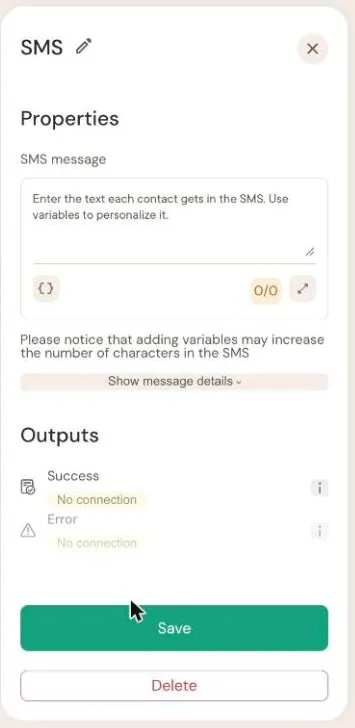
The SMS brick sends a text message to the contact during or after the call, for example a confirmation, a link or a callback number.
Every text setting of this brick takes variables and contact fields, such as {{contact.first_name}}. Number, switch and list settings do not. See Variables.
Before you use it
Section titled “Before you use it”The agent needs an SMS provider and a sender: Edit agent → SMS → Send SMS. See SMS sending.
A scenario with an SMS brick is refused on publish while an agent that plays it has no SMS settings. Set up SMS on the agent first; a draft can be saved without it.
Settings
Section titled “Settings”| Setting | What it does |
|---|---|
| SMS message | The text, with variables |
| Show message details | Counts characters and SMS parts |
GSM characters count as 1 (some as 2). Any character outside GSM limits a part to 70 characters. A variable’s length is unknown until the call, so leave room.
Outputs
Section titled “Outputs”| Output | When |
|---|---|
| Success | The provider accepted the message |
| Error | The message could not be sent |
Example
Section titled “Example”After booking: Your appointment is on {{appointment_date}}. Call us on {{agent.number}} to change it. Send Incomplete outputs of earlier bricks here too, so callers who hang up still get the details.
Example: after a missed call
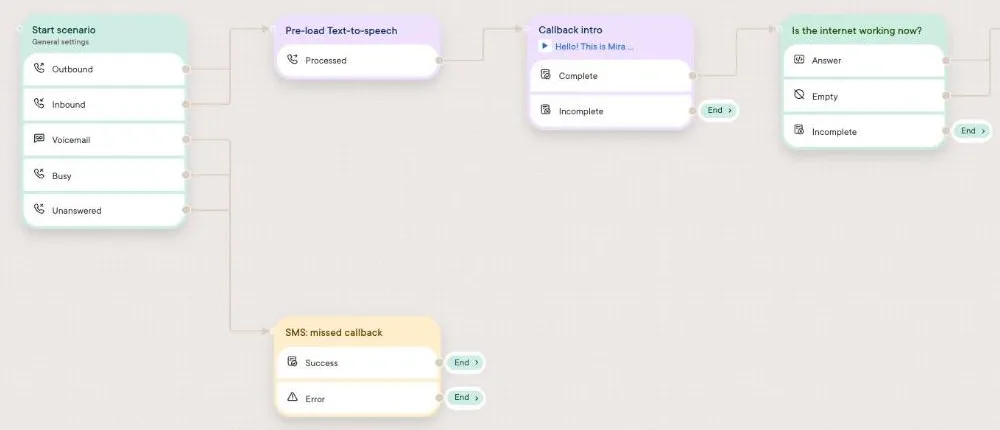
Section titled “Example: after a missed call”An information call (a callback, a reminder) does not need five attempts. Link the Busy, Unanswered and Voicemail outputs of Start scenario to one SMS brick, then to End scenario. After Busy and Unanswered there is no call, and the SMS still runs; it goes to the number that was called.
Hi, it’s Mira from Apifonica Support. I just called about your request {{contact.complaint_id}}: your internet connection has been fixed, please check it. If it still doesn’t work, call us at +34 910 03 47 94, or wait for my call.
Promise a second call only if something will place it: a manual automation does not call again on its own.