Dashboard
The Dashboard answers one question: what are the account’s lines doing right now. It opens after sign-in and has three cards.
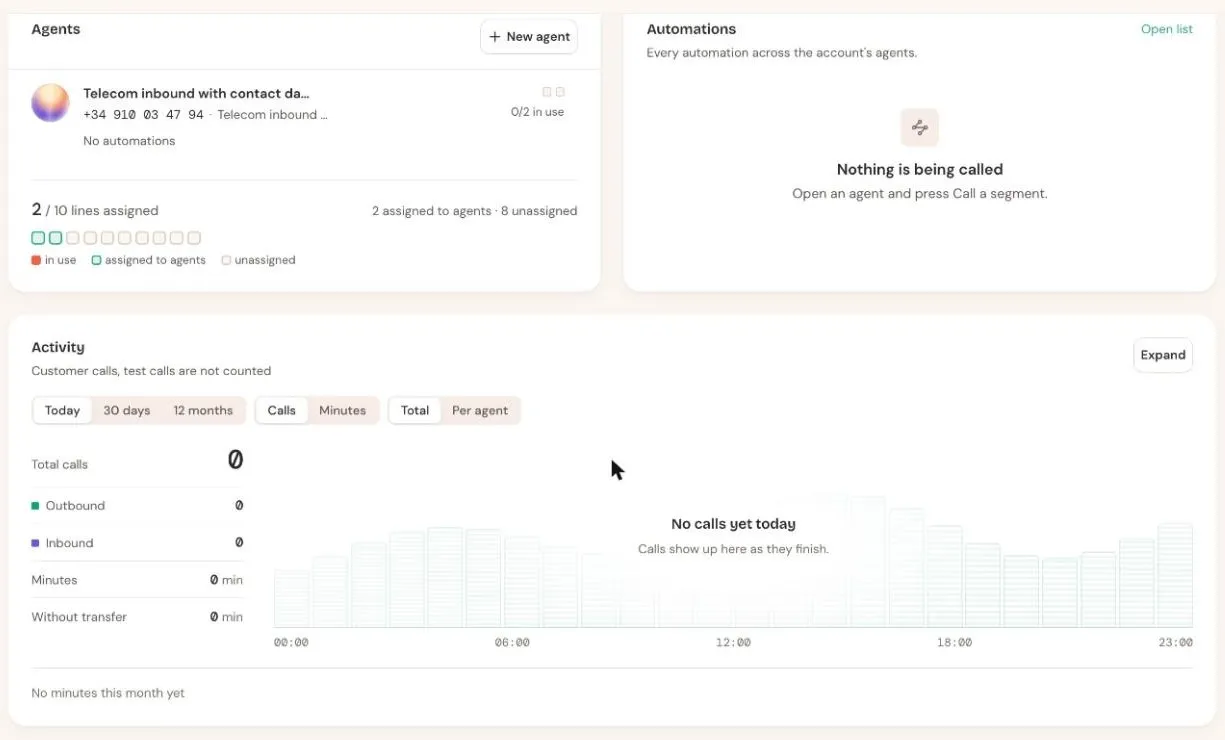
| Card | What it shows | Tip |
|---|---|---|
| Agents | Every agent with its number, scenario, automations and lines in use (for example 0/2). Below: the account’s lines, such as 2 / 10 lines assigned, split into in use (red), assigned to agents (green) and unassigned | Unassigned lines are free to give to a new agent. + New agent starts the agent form |
| Automations | Every outbound automation across the account’s agents and its state | Nothing is being called means no automation is running. Open list goes to Automations |
| Activity | Calls and minutes for Today, 30 days or 12 months, as a Total or Per agent: total calls, outbound, inbound, minutes and minutes without transfer, plus a chart by hour | Customer calls only: test calls are not counted. Expand opens a larger view |
The same Activity card, filtered to one agent, appears on each agent’s page.
Reading the line count
Section titled “Reading the line count”Lines are the account’s simultaneous call slots. A line counts as in use while any call holds it, including a test call from the builder. When all lines are in use, a new test call waits for a free one. What happens to other new calls (inbound and automation calls) when all lines are busy is to confirm.