Variables
A variable is a named value in double braces, such as {{order_status}}; scenarios read variables in any text field and write them from bricks, and contact data and system values are variables too.
Using a variable
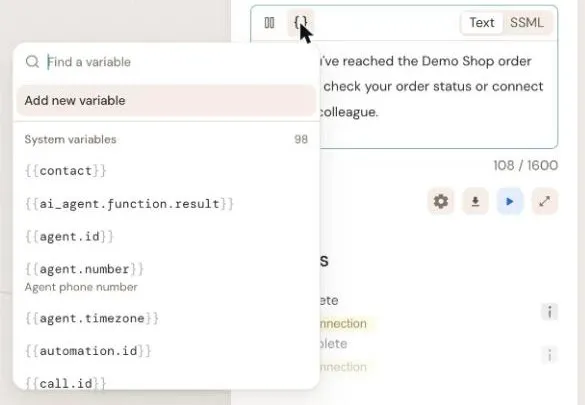
Section titled “Using a variable”- Type the name in double braces in any text field, or click { } to pick one. A valid name is highlighted.
- The picker lists your user variables and about 100 system variables.
- In the JavaScript brick, read and write variables with
storage.get('key')andstorage.set('key', 'value').
Kinds of variables
Section titled “Kinds of variables”| Kind | Examples | Set by |
|---|---|---|
| User variables | {{order_status}}, {{customer_name}} | Variables, HTTP request and JavaScript bricks |
| Contact data | {{contact.first_name}}, {{contact.address.index}} | The contact record; a call can update it |
| Call and agent | {{call.id}}, {{agent.number}}, {{agent.timezone}}, {{automation.id}}, {{recipient.number}} | The platform, per call |
| Time | {{system.time.rfc3339}} | The platform |
| Last brick results | {{last_question.answer_filtered}}, {{last_webhook.body}}, {{last_webhook.error}}, {{last_webhook.http_status_code}} | Question and HTTP request bricks |
| AI skills | {{ai_agent.function.result}} | AI question, when a skill fires |
The full list of system variables is returned by the API operation getSystemVariables.
Contact fields in a call
Section titled “Contact fields in a call”A brick reads a field of the contact’s data as {{contact.<field>}}. A field inside an object is {{contact.address.city}}; an item of a list is {{contact.phones.0}}, counted from 0. A field that holds an object or a list reads as JSON text. A field the contact does not have reads as empty text.
For example, the contact holds this data:
{"first_name": "Anna", "tier": "gold"}A Text-to-speech brick with the message Hello, {{contact.first_name}}! says “Hello, Anna!”.
When the call ends, its variables keep the contact’s data under one key, contact, as JSON text. A field the call wrote is in it too:
{ "contact": "{\"first_name\":\"Anna\",\"tier\":\"gold\"}"}Which settings take variables
Section titled “Which settings take variables”- Text settings take variables and contact fields. Number, switch and list settings do not.
- In Conditions and the Variables brick, only the value takes them.
- In HTTP request, the method, the URL, the body, the headers, the form fields, the authentication, the proxy URL, and the path and default of a response mapping take them.
- A setting that names a variable to write, such as the variable of a response mapping, is written to and not read.
- Start scenario, End scenario, Input and output and Recording consent take no variables.
Where variables are set
Section titled “Where variables are set”- Variables brick: sets one or more values directly. See Variables (brick).
- HTTP request brick: maps fields of the response into variables, each with a default when the path is missing.
- JavaScript brick: any value your code stores with
storage.set. - Question and AI question: the recognised answer and the values a skill captured.
- Contact data: available as variables throughout the call; a scenario can write fields back to the contact during the call. See Contacts and segments.
Branching on variables
Section titled “Branching on variables”The Conditions brick compares variables with values and sends the call to one output per condition group, or to Otherwise. See Conditions.
Variables set inside a sub-scenario are visible in the main flow too. See Sub-scenarios.